How to ask permission to record a meeting: example scripts
Ask permission to record a meeting first, then again once recording starts so the yes is recorded. Example scripts for host, guest, client and interview calls.
By The MeetNotely team · · · 8 min read

These scripts are for anyone about to record a call: the host, a guest who wants to bring a notetaker, or someone running an interview. Why and when to tell people is in our guide to AI notetaker etiquette; this page is the wording.
None of this is legal advice. Whether you need consent depends on where you and the others are, so check the rules where you are. Copy a block, change the brackets.
What every ask for consent needs: four parts and a question
A polite ask, even a short "Do you mind if I record this?", answers four things, then asks a question. The scripts we read before writing this one usually missed at least one.
- Who is recording, and for whom: you, or your notetaker by name.
- What is captured: audio, video, a transcript, AI notes. Say "video" if video is on.
- Where it goes and who sees it: "notes to everyone here", or "only me".
- How to say no, and that no is fine.
Then ask a question that needs an answer, and wait.
Our view: silence isn't a yes, and neither is staying on the call. Some guides treat staying as consent; we don't. Ask, and wait until each person has answered.
Before the call: the invite line and the email
The first ask goes in writing, so people can object without doing it in front of everyone.
The invite line
Paste this into the calendar description. For a recurring meeting, put it in the series, and still say it at each start.
This call will be recorded with [tool] so we get notes. It captures [audio / audio and video] and a transcript, and the notes go to [everyone invited / only me]. If you'd rather not be recorded, reply here or tell me at the start, and we won't record.
Host, client call: the email before
For a client, a short email a day or two before is clearer than a line in the invite. The subject asks the question, so the answer can come in one word.
Subject: Recording our call on [date]?

Hi [Name],

I'd like to record our call on [date] with [tool], so I can listen instead of typing. It captures [audio / audio and video] and a transcript, and I'll send the notes to [you and me / everyone on the call].

If your company doesn't allow recording or notetakers, just tell me and I'll take notes by hand. Either way is fine.

Thanks,
[Your name]
What should the host say to ask permission when the call starts?
Say it before you press Start or send the notetaker, then wait for answers.
Internal team meeting
Ask the quiet ones by name: a muted person can't object if nobody asks them.
Before we start: I'd like to record this with [tool] for notes. It records [audio / audio and video] and makes a transcript, and the notes go to everyone here. If you'd rather I didn't, say so now or message me, and I won't. [Name], [Name], OK with you?
Client call
Confirm what the email said, and offer to stop before anything sensitive. Stop, not pause: some tools, ours included, have no pause.
As I mentioned by email, I'd like to record this call with [tool] so I can send you the notes. It's [audio only / audio and video]. Is everyone OK with that? And if we get to pricing or anything confidential, tell me and I'll stop the recording before we get there.
An outside guest whose company may not allow notetakers
Some organisations ban outside notetakers in their own meetings (our etiquette guide quotes three). A partner, vendor or agency may be bound by a rule you can't see, so ask about it directly.
One question before we start: does your organisation allow recording in calls with outside companies? I'd like to use [tool] to record [audio / audio and video] and a transcript for notes, which I'll share with [you / everyone here]. If your rules say no, or you'd just rather not, I'll take notes by hand.
Asking to record an interview
For user research, hiring or a podcast pre-call, ask when you schedule and again on the recording. Say what the recording is for, how long you keep it, and whether you'll quote the person.
Before we begin: I'd like to record [audio / audio and video] of this conversation with [tool]. It's only for [writing up the research / my notes on the interview], it's kept for [time], and [I won't quote you by name / I'll ask before quoting you]. You can ask me to stop at any time. Saying no won't count against you. Is it OK to record?
The last promise is one you make as the interviewer; only make it if you keep it.
If it isn't your meeting: ask the host first
As a guest, the host's answer comes first, and it comes before the call. Then you still ask the room.
By email
Subject: OK if I bring a notetaker to [meeting]?

Hi [Host],

Would it be OK if I use [tool] to take notes in [meeting] on [date]? It would record [audio / audio and video] so I can focus on the discussion. I'll tell everyone at the start and share the notes with you afterwards.

If you'd rather not, I won't, no problem.

[Your name]
By chat
The shortest script on the page, for a direct message to the host.
Quick one: OK if I use [tool] to take notes in [meeting]? I'll tell everyone at the start and send you the notes. Totally fine if not.
When the host says yes: what you say at the start
The host's yes isn't the room's yes, so ask again, out loud.
[Host] said it's OK, but I want to check with everyone: I'd like to record this with [tool] for my notes. It records [audio / audio and video], and I'll share the notes with [Host / everyone]. Is anyone not OK with that?
If the host says no, don't send the notetaker, and don't record the tab instead.
When nobody can see you're recording: a browser tab
When you use a browser-tab recording, nothing joins the call: there's no bot in the participant list and no chat message. Our How it works page lists this under "Tell people" in what to know about recording from a browser. Say it out loud, then paste the chat line.
Out loud: I'm recording this call from my browser for notes: audio and a transcript, and the notes go to [everyone here / only me]. There's no bot in the call, so you won't see anything on your side. If you'd rather I didn't, say so and I won't. Is everyone OK with that?

Chat: I'm recording this call from my browser for notes (audio and a transcript, no bot joins). Tell me if you'd rather not and I'll stop.
If anyone says no, stop the tab recording at once.
Once recording starts, ask again so the yes is on the recording
The yes you got in the invite, or before you pressed Start, isn't in the recording. Ten seconds once it's running puts it there. If you use a notetaker that posts a chat message as it joins, point people to it now: it tells them who to speak to if they'd rather not be recorded. This is our practice for a clear record, not a legal standard.
We're recording now. Just so it's on the recording: [Name], [Name], are you OK with this?
The chat line
Paste this after saying it, for anyone with no sound. Someone who joined by phone can't see the chat, so ask them by name out loud.
This call is being recorded by [me / my notetaker, [name]] for notes: [audio / audio and video] and a transcript. If you'd rather not be recorded, tell me here or out loud and I'll stop.
Someone joins late
A late joiner missed the spoken ask, and may not see the notetaker's chat message from when it joined.
[Name], quick note: we're recording this for notes. Are you OK with that? If not, I'll stop it.
Someone doesn't answer
Silence isn't a yes, so ask once more by name, and offer the chat.
[Name], I didn't hear you: are you OK with us recording? You can type it in the chat. I'll wait before we go on.
Get it in writing
For clients and interviews, a short message after the call (or as a reply to their yes) records what was agreed. It's a courtesy and a reminder for both sides, not evidence of anything.
Thanks for agreeing to the recording today, [Name]. We recorded [audio / audio and video] of [meeting] on [date], and the notes are [where they are]. If you want any part of it deleted, tell me and I'll take care of it.
What do you say when someone says no, or asks you to stop?
Thank them, don't ask why, and confirm nothing will be recorded.
Before recording: the "no" reply
This also works when someone asks you, "Do you mind if we don't record this?" The answer is "Not at all."
Not at all, thanks for saying. Nothing will be recorded. [I'll / [Name] will] take notes by hand and send them round.
Partway: "can we stop?"
Stop first, then speak.
I've stopped it. What was recorded up to now is still saved; do you want me to delete it?
When you stop MeetNotely's notetaker, the app tells you it "leaves the call. What it has recorded so far is kept." Deleting means deleting the whole meeting: one part can't be cut out. What deleting removes is in our privacy policy on how long we keep data. The wider rule is in what to do when someone objects.
What does MeetNotely's notetaker say when it joins?
MeetNotely's notetaker posts one message in the meeting chat as it joins: it names who it is taking notes for, says it is recording the meeting's audio, and tells people who to speak to if they'd rather not be recorded. This is the wording as documented in the app (we haven't shown it in a live call here). By default the notetaker's name is your first name, and the rest of the message uses your full account name. With sample names, for an account called Omar Haddad:
"Hi, I'm Omar Notetaker, taking notes for Omar Haddad. I'm recording this meeting's audio so MeetNotely can write the notes. If you'd rather not be recorded, please tell Omar Haddad."
In general form: "Hi, I'm [notetaker name], taking notes for [your account name]. I'm recording this meeting's audio so MeetNotely can write the notes. If you'd rather not be recorded, please tell [your account name]."
A sample call, start to finish (Omar and his client Dana are made-up names):
- Omar sends Dana the client email. She replies yes and asks whether video will be on. It won't.
- On the call, Omar asks out loud, Dana says yes, and Omar sends the notetaker.
- The chat message above is posted as the notetaker joins.
- Omar asks again so it's on the recording: "Dana, are you OK with this?" She is.
- Before pricing, Dana asks him to stop. Omar stops it and asks whether she wants what was recorded deleted.
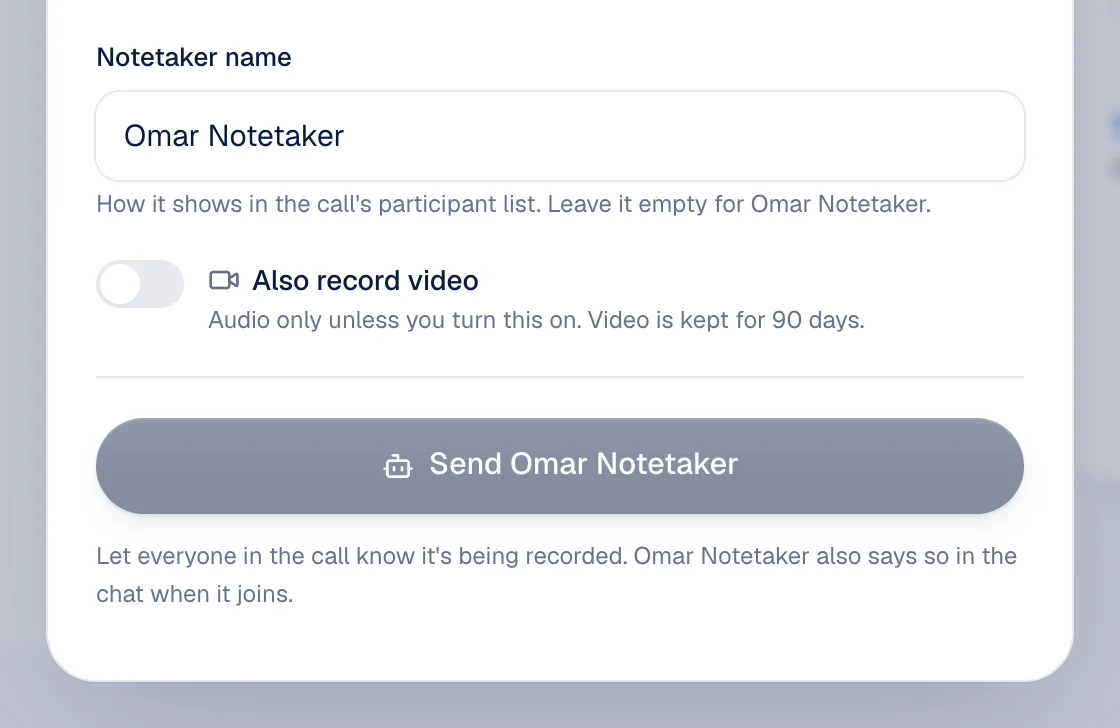
Before you send it, the Send dialog says: "Let everyone in the call know it's being recorded. Omar Notetaker also says so in the chat when it joins."
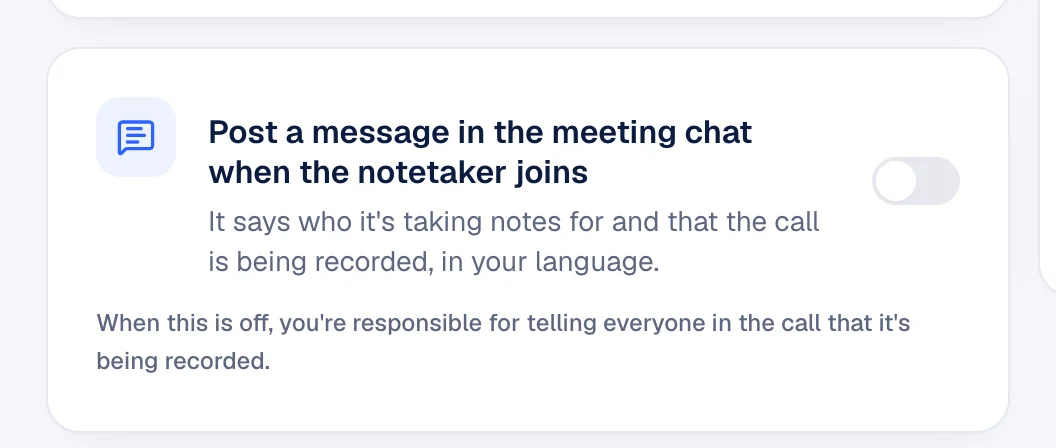
The message can be switched off in the notetaker settings, which say it covers "who it's taking notes for and that the call is being recorded, in your language." With it off: "You're responsible for telling everyone in the call that it's being recorded."
| What the message covers | What you still say yourself |
|---|---|
| Who it's for, that it records | The question, then wait: it tells, it doesn't ask |
| "audio" | "Video too", if you turned video on (Pro and Enterprise) |
| Your language | The other language, on a mixed call |
| How to object: tell [the person it's taking notes for] | Where the notes go and who sees them |
| Nothing about stopping | That you'll stop, not pause: it has no pause |
That is the exact wording, and it arrives as the notetaker joins, so your ask comes before you send it. Who can open the notes afterwards is in the policy's part on share links. You can read who builds MeetNotely, and how we handle your data.
Questions people ask
Is staying on the call the same as saying yes?
Our view: no. Ask, and wait for an answer. Rules differ by place, so check them where you are.
Do I need to ask every time for a recurring meeting?
Put it in the series invite and say it at each start. New people need it most.
Can I record if the host said yes but a guest says no?
No: stop, or don't start. The host's OK is the first step, not the room's.
What if I'm recording in person?
Say it out loud. There's no banner or chat in a room, so your words are the only notice.
Is it legal to record without asking?
This page doesn't cover law; it depends on where you and the others are. The polite answer doesn't change: ask.