Meeting recap email template, with action items
Copy a meeting recap email template for your team or a client: decisions, owners, dates, the task nobody took, a filled-in example, and when to skip the link.
By The MeetNotely team · · 9 min read

At 3:46 of a four-minute sample meeting, the chair recaps four items and names nobody. Five of the eight tasks agreed in that call aren't in her recap, so an email copied from it would lose them, including the one task nobody took. We wrote the recaps on this page by hand from that script and one other.
Each action line in a recap uses the four parts of an action item: task, owner, date and source. This page covers the message around those lines: the subject, the order, who gets it, the tone, and what to link.
What goes in a meeting recap email
A meeting recap email needs six blocks, in this order (our practice, and the order the templates follow):
- Decisions, one line each, so someone who reads only the top knows what changed.
- Actions: owner first, then the task, then a calendar date.
- Needs an owner: any task nobody accepted, with one named person asked to settle it.
- Parked: open questions, and when they come back.
- The link, if there is one, with the date it stops working.
- A time for corrections, so that silence means something.
Don't drop block 3. A blank line gets ignored; a question put to the chair by name is harder to skip. The same goes for dates: write "date to confirm", and never a date nobody said.
Who writes it: whoever kept the notes. If the chair kept them while running the call, taking notes while leading the meeting, with a read-back by name at the end, gives the recap every task, with its owner or the question of who owns it.
Who gets it: everyone who attended, plus anyone given a task who wasn't there. Someone absent learns about their task from this email, so say who agreed it.
Tone: write the way the meeting talked. First names for colleagues, plain verbs, one sentence of context at most. Leave out who argued what.
Meeting recap email template for your team
The internal template puts decisions before actions and keeps the moment each one was agreed, so anyone can check a line against the recording.
Subject: Recap: [meeting], [date]: [n] actions, [n] decisions

Hi all, here is what we agreed.

Decisions: [decision] ([time])

Actions: [Owner]: [task], by [date] ([time])

Needs an owner: [task]. [Chair], who takes this?

Parked: [question], back on [next meeting]

Notes and recording: [link, stops working on date]

Corrections by reply before [time], please.
Repeat the Decisions and Actions lines as often as you need. Drop the times if your team doesn't keep recordings. Delete "Needs an owner" only when every task has a name.
Client meeting recap email template
A client recap separates what you will do from what they will do, and leaves out your side's internal talk and the timestamps.
Subject: [Client] and [Company]: next steps from [date]

Dear [Name], thank you for your time on [date].

We agreed: [1 to 3 lines]

We will: [task], by [date], [name]

You will: [task], by [date], [name]

Still to confirm: [item]

Selected notes: [link, notes only or clip]

Please tell me if I have missed anything.
"Still to confirm" lets the client correct something while it's still one line in an email.
A decisions-only recap for people who weren't there
When people only need the outcome, send what was decided, when it takes effect and who to ask.
Subject: Decided: [topic], [date]

[Decision], effective [date]. [Owner] leads.

Questions to [name] by [date]. Record: [link]
Don't forward the full recap to this group. They don't need the task list, and the people on it may not expect them to read it.
Meeting recap email examples from two sample meetings
Here is the internal template filled in from a 4:06 weekly product sync that we wrote and voiced with text-to-speech. The names, the client (Gulf Logistics), the product being launched, the pricing talk and the Google Drive work are invented, and none of it is MeetNotely's pricing, storage or roadmap. We date the meeting Monday 19 October 2026 to turn "today" and "Thursday" into dates. Written by hand from the script, not product output. Times are when each line starts.
Subject: Recap: Weekly product sync, Mon 19 Oct: 8 actions (1 needs an owner), 2 decisions

Hi all, here is what we agreed.

Decisions
- Push notifications follow the account language (1:11)
- Arabic onboarding ships Thursday morning, Riyadh time (1:41)

Actions
- Yousef: send the Arabic email template to Lina, by Mon 19 Oct (1:36)
- Lina: make push notifications follow the account language, by Tue 20 Oct (1:19)
- Omar: send the deck to Gulf Logistics, by Thu 22 Oct (2:49)
- Lina: switch large uploads to resumable uploads, expected next sprint (3:11)
- Omar: tell the pilot group about the launch, date to confirm (1:46)
- Yousef: make a one-page diagram of where the data goes, date to confirm (2:38)
- Lina: show the folder name, with a link, on the settings page, date to confirm (3:42)

Needs an owner
- Tell Gulf Logistics long recordings land next sprint, date to confirm (3:30)
  Sara, who takes this?

Parked
- Renewal discount: back once we see their usage (2:54)

Notes and recording: [share link, stops working 18 Nov]

Corrections by reply before 5 pm Tuesday, please.
Three choices in it only make sense in an email:
- The unowned task is put to Sara by name. She chaired the call, so she can assign it. "Who takes this?" sent to the whole list lets everyone wait for someone else.
- The client version below has no times. They point into a recording the client can't open.
- The link's end date is in the body. Someone opening the email on 19 November finds a dead link, and the date tells them to ask for a new one.
Two calls also stay out of Decisions: Sara's "let's put it in the deck as a standard option" (2:31) is an instruction about Omar's deck, and "Let's be upfront with them" (3:30) appears as the task nobody took. Why "expected next sprint" stays a hedge is one of the five traps in that same sample meeting.
The correction deadline and the link's date are ours; nobody said them in the call. The 18 November date assumes the link was made on the day of the meeting: links stop working 30 days after they are made, by default.
The client version comes from a second sample, a 1:34 Gulf Logistics call, also scripted and voiced with text-to-speech, with invented names. We assume it took place on Friday 16 October 2026. Written by hand from the script, not product output; none of it is MeetNotely's pricing or storage.
Subject: Gulf Logistics: next steps from Fri 16 Oct

Dear Khalid, dear Noura, thank you for your time on Friday 16 October.

We agreed: to aim for a pilot with ten managers next month.

We will: send the proposal, with the data flow diagram, by Thu 22 Oct, Omar

You will: review the proposal on Mon 26 Oct, Gulf Logistics

Still to confirm: IT's security approval comes first. Noura, who will lead it, and by when?

Please tell me if I have missed anything.

Omar
Khalid says "we'll review it on Monday", so the review sits with the company rather than with him. The script gives IT's approval no owner and no date, so it goes under "Still to confirm", addressed to Noura, who raised it. There's no link line because nothing needed one. For anyone checking the script: the diagram is at 0:52, IT's approval at 1:18, the pilot at 1:22 and 1:26, and the proposal and the review at 1:26.
Meeting recap subject lines and when to send
A recap subject line should name the meeting, the date and what's inside, so people can find it again by searching their inbox.
| Recap | Subject pattern |
|---|---|
| Team | Recap: [meeting], [date]: [n] actions, [n] decisions |
| Client | [Client] and [Company]: next steps from [date] |
| Decision only | Decided: [topic], [date] |
| Minutes attached | Minutes for approval: [meeting], [date] |
We send the recap the same day, while people still remember what they said. That's our practice, not a measured result. Then check owners and dates before you send: that's where a misheard name, or a "probably" that became a deadline, gets caught.
What a share link adds, and when to leave it out
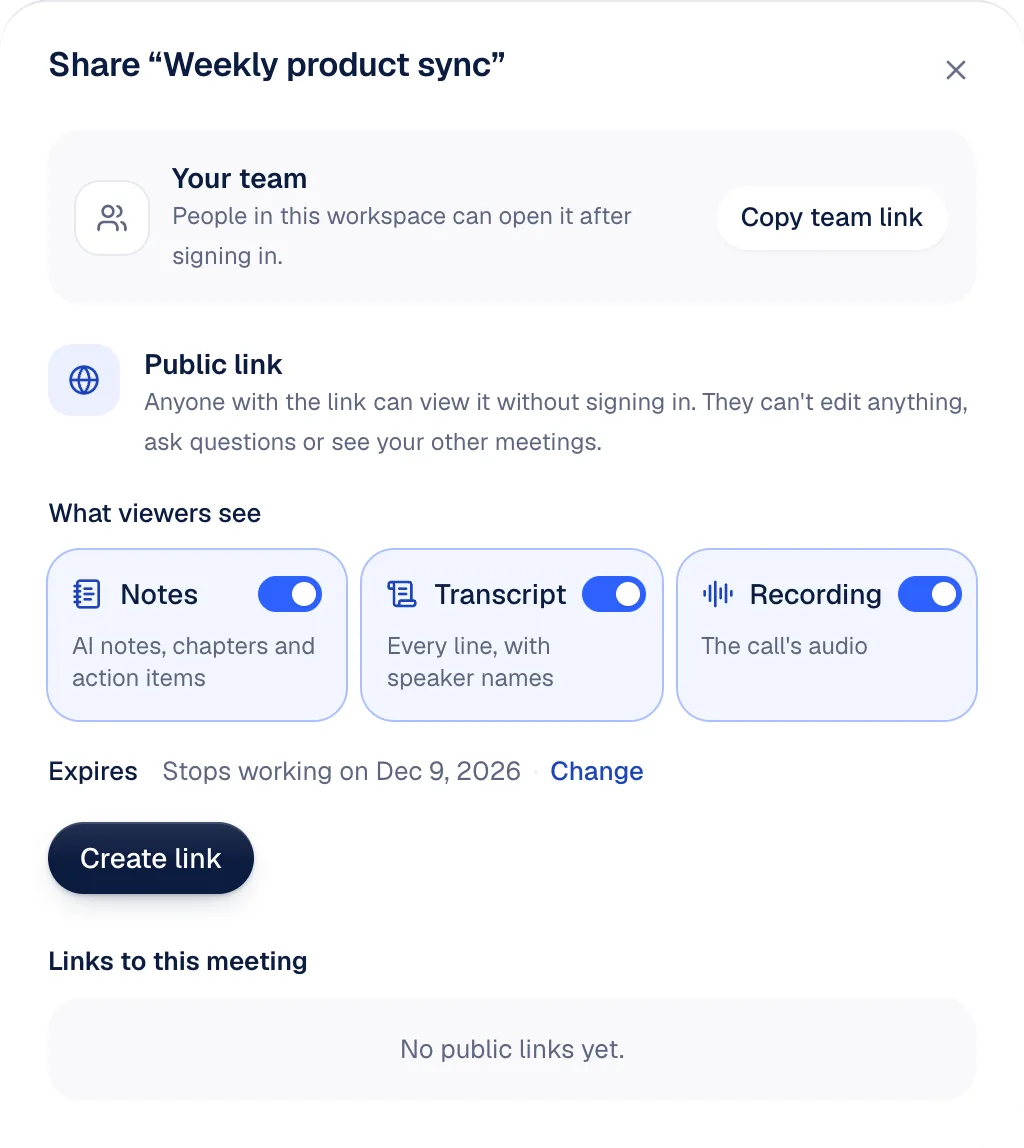
A share link lets someone check a line of your recap against the meeting, without an account. It doesn't replace the email, which is still where people read the decisions and owners. Here is what a MeetNotely link does; the rest is under share links, clips and action items, feature by feature.
- The page is read-only. No sign-in. The reader can't edit, tick an item off or use Ask. It's marked noindex, and its interface switches between English and Arabic.
- You pick what it shows: Notes, Transcript, Recording. All three start switched on (Recording only when the recording is kept in MeetNotely's cloud), so turn off what this reader shouldn't see.
- Action items travel only with Notes. They're action items that play the moment they were agreed, each with its owner, the due date as it was said, and a time chip. Without Recording, the chip has no sound to play.
- It expires in 30 days by default, or 7, 90 or never. The dialog shows the date it stops working, so put that in the email. Any member of the workspace can revoke it at once, and the dialog lists each link's views.
- Copy it straight away. The address is shown once.
- To open a link at a moment, add
?t=and the seconds:?t=71opens the player at 1:11. - A clip, on paid plans, shares up to five minutes and nothing outside them. Clip audio is available for meetings recorded in the browser. See which plans include clips.
Two limits to plan around:
- "Copy notes" leaves out the action items. It copies each heading and bullet with its time. Type the actions into the email yourself. MeetNotely doesn't email the recap for you.
- Action items can't be edited. If your email corrects an owner or a date, the page still shows the original, so say so in the email. Name your speakers, or owners on the page read "Speaker 2".
When not to link: a whole-meeting link shows a client everything said on the call, including internal talk. In the sample sync, Sara parks a renewal discount for Gulf Logistics "until we see their usage" (2:54). Send that client the link and they can read it.
A notes-only link holds back the transcript and audio but still shows every section of the notes, so read them first. Otherwise send a clip, or no link. Our rule: a client gets no whole-meeting link to a call they weren't on.
Recap email, meeting summary email or minutes?
A recap email and a meeting summary email are the same message under two names: a short note sent after the call. Minutes are the record, and we cover how minutes differ from notes separately.
| Recap or summary email | Minutes | |
|---|---|---|
| Job | Tell people what to do next | Record what was decided |
| Corrected by | A reply | Whatever your bylaws say |
| Times and links | Useful | We drop them from the signed version |
To email minutes, send one line with them: "Minutes of [meeting], [date], attached for approval by [date]. Actions are in the table at the end."
Questions people ask
Is a follow-up email after a meeting the same as a recap?
A follow-up email after a meeting is often the same as a recap. A recap goes to everyone in the meeting; a sales follow-up goes to one buyer and asks for the next step. The client template works for both.
What if nobody agreed a deadline?
If nobody agreed a deadline, write "date to confirm" and ask the owner in the same email.
Should I attach the whole transcript?
Don't attach the whole transcript by default. Most readers need the decisions and actions. Link only what someone needs to check.
Who should send the recap?
The person who took the notes should send the recap, unless the chair names someone else. Our practice is to settle that before the meeting ends.